
Silence Premium Do Not Disturb2.61 - Google Play
You'll be able to see results in few seconds.
Publisher Description
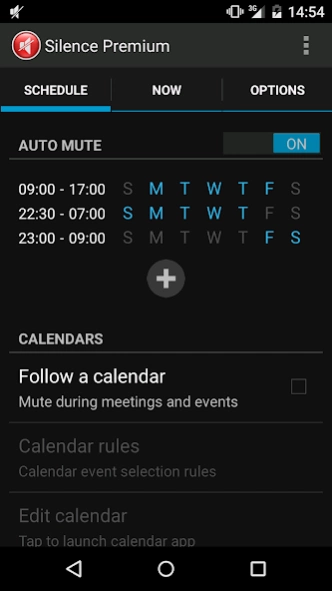

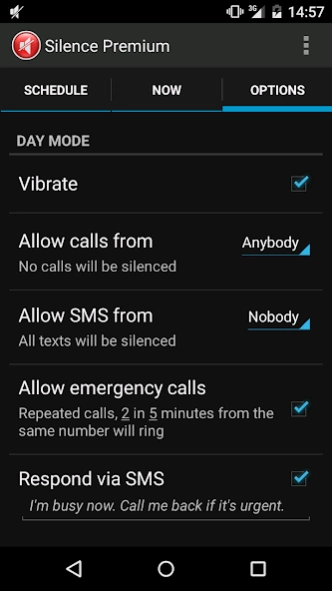

Do not disturb, automatically silence the phone based on your schedule.
If you forget to mute your phone and calls rings or notifications chime during important meetings or wakes you up at night, then this Do Not Disturb app (DND) is for you. Enable Calendar and Night mode, and forget about having to play with volume control to silence your phone.
Several features set this app apart from others in the category. This application was written with security in mind. As such, it requires just a few permissions to read user's contacts, calendar and to send and receive SMS. Most other apps require network permissions, and some need access to SD storage, which allows them to transfer any of the personal data from the phone unnoticed. This app can't do that, so you can rest assured that your personal data is safe.
This app offers the following features:
* It can silence the phone for the night and/or during office hour, meetings or calendar appointments
* Instant silent mode timer can be started with just 1 click,
* Instant timer can also be activated via the widget by the volume bar
* It can keep the phone on silent + vibrate all day and go completely silent for the night
* It mutes phone calls and all audible notifications during quiet time, except alarms
* Day and night time schedule can be programmed separately for each day of the week
* Calendar selection is configurable, and only Busy events are muted
* Supported calendars include Google calendars, Exchange
* SMS and call exceptions are supported while the phone is muted
* You can allow separate groups of contacts to ring at night and/or during the day
* Enable Emergency mode to let repeated calls from the same number ring
* Use No Exceptions mode to block calls from allowed contacts for the duration of an important meeting
* Use Respond via SMS to let the caller know to call back again if it's urgent
* Optionally disable Bluetooth handsfree during quiet time
* Cancel mute when you wake up early or the meeting ends early
Certain vendor phones have issues with vibrate mode. If your phone doesn't vibrate when you enable vibration in this Do Not Disturb app, change vibration settings in your phone's system settings/sounds menu.
Please don't block this app's notifications on your phone, it can cause the app to not work correctly. Also note that if you have a task killer/booster type of app installed on your device, add this Do Not Disturb app to the list of exceptions. Finally, make sure you don't have other apps that manipulate the speaker running at the same time.
Recent reviews:
AndroidCentral - http://www.androidcentral.com/apps-week-sorcery-crazy-taxi-imsa-and-more
AndroidPit - http://www.androidpit.com/do-not-disturb-blocking-mode
TwitTv - http://twit.tv/show/all-about-android/162
This app was previously called Silence Scheduler Premium.
About Silence Premium Do Not Disturb
The company that develops Silence Premium Do Not Disturb is Cabooze Software. The latest version released by its developer is 2.61.
To install Silence Premium Do Not Disturb on your Android device, just click the green Continue To App button above to start the installation process. The app is listed on our website since 2019-04-04 and was downloaded 0 times. We have already checked if the download link is safe, however for your own protection we recommend that you scan the downloaded app with your antivirus. Your antivirus may detect the Silence Premium Do Not Disturb as malware as malware if the download link to com.cabooze.buzzoff2 is broken.
How to install Silence Premium Do Not Disturb on your Android device:
- Click on the Continue To App button on our website. This will redirect you to Google Play.
- Once the Silence Premium Do Not Disturb is shown in the Google Play listing of your Android device, you can start its download and installation. Tap on the Install button located below the search bar and to the right of the app icon.
- A pop-up window with the permissions required by Silence Premium Do Not Disturb will be shown. Click on Accept to continue the process.
- Silence Premium Do Not Disturb will be downloaded onto your device, displaying a progress. Once the download completes, the installation will start and you'll get a notification after the installation is finished.
Program Details
System requirements
Download information
Pricing
Version History
version 2.61
posted on 2019-04-05
Fixed vibrate issue.
Fixed issue with notifications sounding in the previous release.
Changes to support Google's restricted CallLog and SMS permissions. Latest version disables SMS sending capabilities, as well as call filtering based on incoming caller ID. On the plus side, it's now using the filtering based on Favorites, and should be very stable on wide range of devices. We exploring a way to bring the more flexible call filtering and SMS auto-responder back.
version 2.61
posted on 2019-04-04
Fixed vibrate issue.
Fixed issue with notifications sounding in the previous release.
Changes to support Google's restricted CallLog and SMS permissions. Latest version disables SMS sending capabilities, as well as call filtering based on incoming caller ID. On the plus side, it's now using the filtering based on Favorites, and should be very stable on wide range of devices. We exploring a way to bring the more flexible call filtering and SMS auto-responder back. Stay put.
version
posted on 2018-02-17
- Multiples bugs fixed. Allowed calls/SMS should ring reliably and phone should remain quiet otherwise.
- Use "Allow other widgets" option to start/stop mute with built-in DND widget or switch on OnePlus.
- Added "End with alarm" option to stop night mode.
- Added "Known contacts only" under Repeated calls option.
- Added option to disable blinking LED at night on Samsung N4/N5/S5/S6/S7 devices.
- Disable "Use Priority Interruptions" feature on Xiaomi, Huawei and Samsung phones.
version
posted on 2016-08-22
- Added new SMS options: auto-reply to SMS, reply to known contacts only, area code filter options.,- Fixed issue with Galaxy S6 not asking for notification permission.,- Fixed issue with contacts on Huawei phones.,- Fixed Galaxy Note/Android 6.0 issue.,- Updated German strings, thanks Thomas.,Please report any issues to caboozesw@gmail.com.
version 1.8.5
posted on 2013-07-03
Several fixes and updates
Disclaimer
Official Google Play Link
We do not host Silence Premium Do Not Disturb on our servers. We did not scan it for viruses, adware, spyware or other type of malware. This app is hosted by Google and passed their terms and conditions to be listed there. We recommend caution when installing it.
The Google Play link for Silence Premium Do Not Disturb is provided to you by apps112.com without any warranties, representations or guarantees of any kind, so access it at your own risk.
If you have questions regarding this particular app contact the publisher directly. For questions about the functionalities of apps112.com contact us.
